In the Product names section of the local project options, you can manage (edit and delete) existing product names and add new products (see Figure 1).

Figure 1 - Editing product names
The following table explains the available buttons in the Product Names tab:
Button |
Description |
|
The + button adds a new row to the table of product names, in which a new product name can be created. The newly created product is then available in the project. |
|
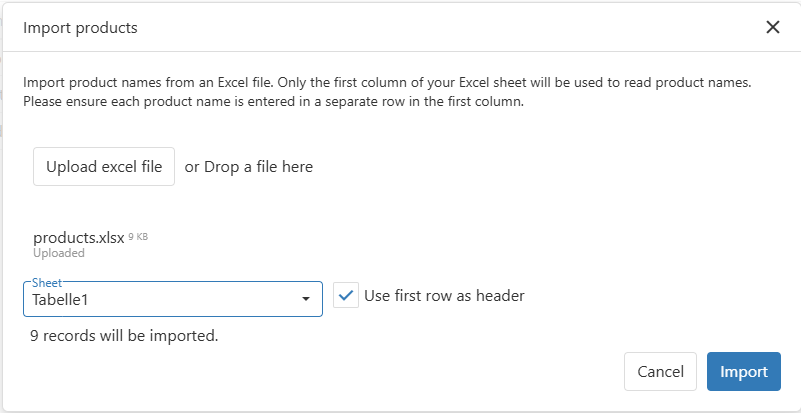
The Import button opens a dialog where the user can import product names via Excel file.
Figure 2 - Excel import for products |
|
The edit icon edits the selected product name (icon changes to save icon) |
|
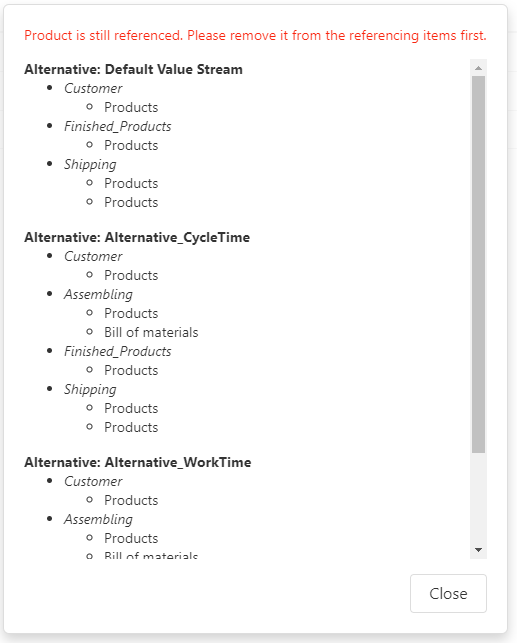
The trash icon deletes the selected product name. If the selected product is still used in the project, the following message appears:
Figure 3 - Product still in use |
|
The save icon saves the selected product name (icon changes to edit icon) |
|
The cancel icon cancels editing of the selected product name (icon changes to delete icon) |






© SimPlan AG - Hanau District Court, Commercial Register (Part B) 6845 - info@simplan.de - www.simplan.de/en